How to Read Your Report
Your report contains a significant amount of data across multiple pages. This guide is designed to help you approach it with confidence — understanding what each area of the report is telling you, which pages to use for which questions, and how to move between the big picture and individual students without getting lost.
You do not need to read every page in order. The report is structured so you can navigate to the area most relevant to your role or the question you are trying to answer.
What the Report Tells You
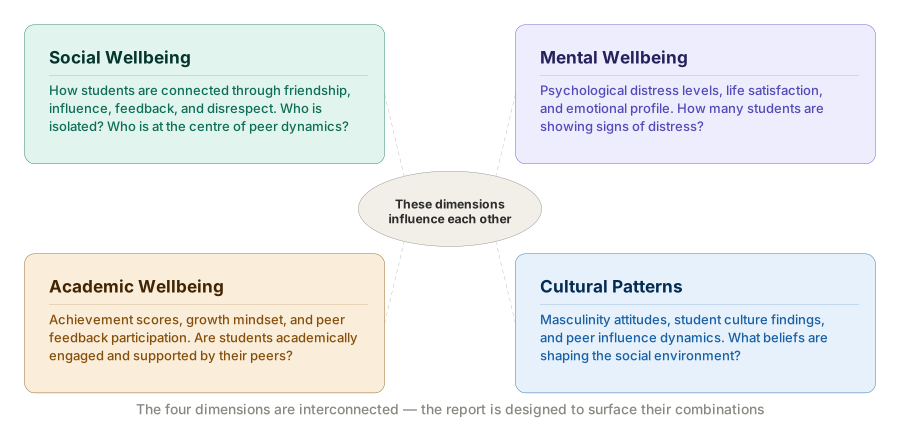
The report analyses your cohort across four interconnected dimensions of student life:
- Social wellbeing — How students are connected to one another through friendship, influence, feedback, and disrespect. Are students socially included? Who is isolated? Who is at the centre of peer dynamics?
- Mental wellbeing — Students' psychological distress levels, life satisfaction, and emotional profile. How many students are showing signs of distress? What does the overall mental health of the year group look like?
- Academic wellbeing — Students' achievement scores, growth mindset, and participation in peer feedback. Are students academically engaged? Are low-achieving students connected to peers who can support their learning?
- Cultural and attitudinal patterns — Masculinity attitudes, student culture findings, and peer influence dynamics. What beliefs and values are shaping the social environment? Are there attitudes that may be contributing to disrespect or exclusion?
These dimensions are not separate — they influence each other. A student with high psychological distress who is also socially isolated is in a more precarious position than a student with the same distress score who has strong reciprocal friendships. The report is designed to surface those combinations so you can respond to the full picture.
Three Levels of Analysis
Every page in the report operates at one of three levels. Understanding which level you are on helps you know what kind of question you can answer and when to move to a different page.
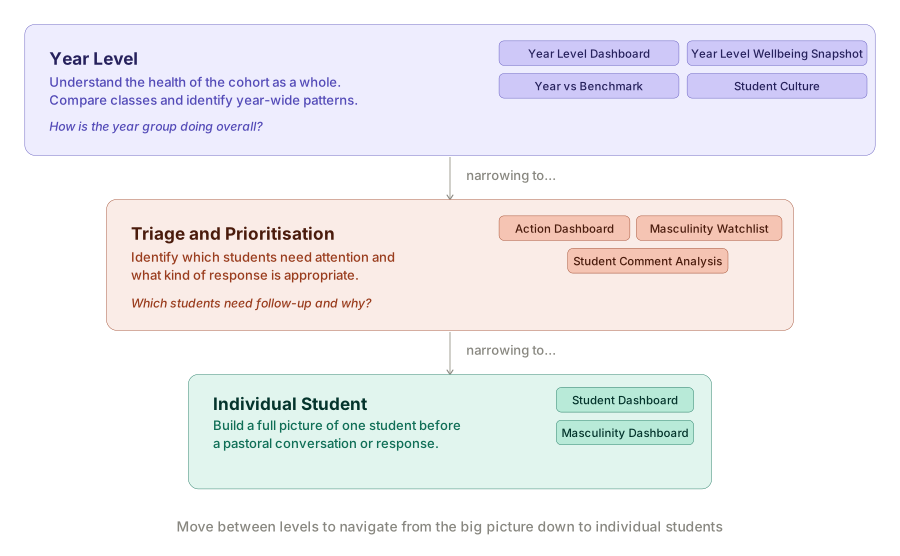
Year-level
These pages aggregate data across all students in the cohort. They answer questions about the year group as a whole — the overall wellbeing of the cohort, how different classes compare, and what cultural forces are shaping the social environment.
Use year-level pages when you want to:
- Understand the health of the cohort before looking at individuals.
- Identify whether a pattern is year-wide or concentrated in specific classes.
- Compare your year group to a national reference population.
- Understand the structural social dynamics that no individual student view can reveal.
The year-level pages are: Year Level Dashboard, Year Level Wellbeing Snapshot, Year vs Benchmark, and Student Culture.
Individual student
These pages focus on one student at a time. They answer questions about a specific student's wellbeing, peer relationships, survey responses, and attitudes — and they are where you go before having a pastoral conversation or deciding on a response.
Use individual student pages when you want to:
- Build a rounded picture of a student before speaking with them.
- Understand the peer dynamics behind a concern or flag.
- Review a student's masculinity attitudes in the context of their broader profile.
- Investigate a student flagged by a year-level view.
The individual student pages are: Student Dashboard and Masculinity Dashboard.
Triage and prioritisation
These pages are designed to help you identify which students need attention and what kind of response is appropriate — without having to review every student one by one.
Use triage pages when you want to:
- Know quickly which students require follow-up and why.
- See which students score highest on concerning indicators across the cohort.
- Identify students whose written comments signal distress or a concern.
The triage pages are: Action Dashboard, Masculinity Attitudes Student Watchlist, and Student Comment Analysis.
Finding Answers to Common Questions
Rather than reading every page, you can go directly to the page most relevant to what you need to know.
| If you want to know… | Start here |
|---|---|
| How is the year group doing overall? | Year Level Dashboard |
| Which classes are struggling more than others? | Year Level Wellbeing Snapshot → Compare tab |
| How does our school compare to others nationally? | Year vs Benchmark |
| Which students need urgent attention right now? | Action Dashboard |
| Who is socially isolated in the year group? | Year Level Dashboard → Friendship network → #Isolates |
| Which students are experiencing the most disrespect? | Action Dashboard → Support → Disrespected |
| Who is most disrespectful to their peers? | Action Dashboard → Intervene → Disrespectful |
| What is the full picture for a specific student? | Student Dashboard |
| Which students have the most concerning masculinity attitudes? | Masculinity Attitudes Student Watchlist |
| What is one student's masculinity profile in detail? | Masculinity Dashboard |
| What are students saying in their own words? | Student Comment Analysis |
| What social and cultural forces are shaping this year group? | Student Culture |
| What is driving the friendship and disrespect patterns we see? | Student Culture findings |
How Different Roles Might Use This Report
Different staff members will have different reasons to open the report. The table below suggests a starting point based on your role.
Senior leaders and principals are most likely to start with the year-level pages — the Year Level Dashboard, Year Level Wellbeing Snapshot, and Year vs Benchmark — to understand the broad health of the cohort before deciding where to direct resources or conversation. The Student Culture page provides the strategic context for understanding what is shaping peer dynamics at a structural level.
Year coordinators and pastoral leads will typically move between year-level views and individual student pages. A useful starting workflow is to open the Year Level Dashboard for the overall picture, then move to the Action Dashboard for a triage view, and then use the Student Dashboard to review individual students before pastoral meetings or check-ins.
Wellbeing staff and counsellors are most likely to spend time on the Student Dashboard and Student Comment Analysis — understanding individual students in depth, reading their own words, and cross-referencing their wellbeing scores with their peer relationships before a conversation or referral decision.
Class teachers reviewing a specific class can use the Filter by Class feature available on several pages — including the Student Dashboard, Masculinity Dashboard, Year Level Wellbeing Snapshot, and Masculinity Attitudes Student Watchlist — to limit the view to their own students only.
A Suggested Starting Workflow
If you are opening the report for the first time and are not sure where to begin, the following sequence gives you a structured path from the big picture down to individual students.
-
Start with the Year Level Dashboard. Check the three wellbeing gauges to understand the overall health of the cohort. Note any domain — Social, Mental, or Academic — showing a red or low score.
-
Move to the Year Level Wellbeing Snapshot. Open the Compare tab to see whether any class stands out across the three wellbeing domains. This tells you whether what you are seeing is a year-wide pattern or concentrated in a specific group.
-
Check the Year vs Benchmark page to understand how your cohort sits relative to the national reference population. A significant negative result on Mental Distress or Life Satisfaction adds urgency to the findings from the previous two pages.
-
Open the Action Dashboard to see which students need follow-up and what kind of response each one requires. Work through the Support and Intervene columns first.
-
Use the Student Dashboard to review individual students identified through the Action Dashboard. Read the wellbeing panels, the K6 radar chart, and the relevant peer networks before deciding on a response.
-
Review the Student Comment Analysis for any students flagged as High priority. Read their comment in full before acting on the sentiment score.
-
Return to the Student Culture page once you have a sense of the individual picture. The findings here help you understand the structural forces shaping what you have seen across the other pages.
The report is most useful when reviewed as a team. Bringing the Year Level Dashboard and Action Dashboard into a wellbeing or year-level planning meeting gives your team a shared starting point before discussing individual students or deciding on next steps.
Understanding the Data
All data in this report comes from the surveys your students completed. A few important points to keep in mind when interpreting what you see:
- Scores are calculated, not raw. Wellbeing scores — Social, Mental, and Academic — are composite measures derived from multiple survey items, not single questions. They are designed to give a meaningful signal at the cohort and individual level, not to be treated as precise clinical measurements.
- Network data reflects nominations. The social networks in this report are built from peer nominations — students nominating each other for friendship, influence, feedback, and disrespect. A student's position in a network reflects how they are perceived and connected by their peers, based on their survey responses.
- Not all students completed the survey. Students who did not complete the survey will show limited or empty data in individual student views. This is indicated with a dash (—) or a placeholder message where data is missing.
- AI analysis is a starting point. The sentiment analysis on the Student Comment Analysis page was generated using artificial intelligence and should be treated as a guide for directing your attention, not as a conclusion. Always read the comment itself before acting.
- Data reflects a point in time. The report captures student responses at the time of the survey. Students' circumstances change. Use the data as a prompt for conversation and investigation, not as a fixed label.