What is School Guide?
This guide is written for school staff — coordinators, administrators, and IT personnel — who are involved in running SNA Toolbox surveys within their school. It covers everything you need to get started, keep the process running smoothly, and make sense of the results your school receives.
You do not need to be familiar with the full SNA Toolbox platform to use this guide. Each section focuses on the tasks that are relevant to your role and walks you through them step by step.
What This Guide Covers
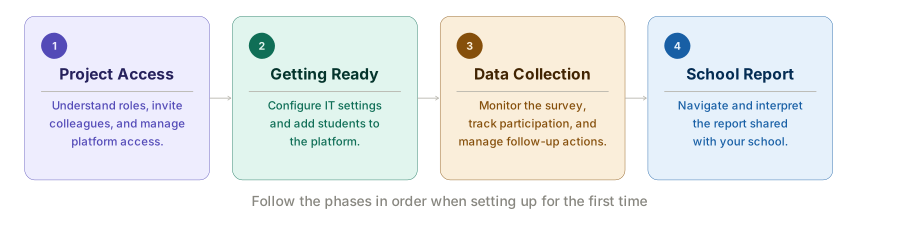
This guide is organised into four main sections, each corresponding to a phase of your involvement with the platform:
- Project Access — Understand the roles available to school staff, invite colleagues to the project, and manage who has access. This section explains what each role can see and do within the platform.
- Getting Ready — Prepare your school's IT environment and add students to the platform before data collection begins. This includes configuring network and email settings to ensure survey access, and importing or manually adding students as nodes.
- Data Collection — Monitor the survey as it runs. Track each student's participation status, resend invitations and reminders, explore live response analytics, and manage follow-up actions raised during the survey period.
- School Report — Understand and interact with the report shared with your school. This section walks you through every page of the report — from the Year Level Dashboard and Student Dashboard to the Action Dashboard, Student Comment Analysis, and Year vs Benchmark — explaining what each page shows and how to use it.
How to Use This Guide
Work through the sections in order if you are setting up for the first time. If you are returning to a specific task — such as checking survey progress or reviewing a report — use the sidebar to navigate directly to the relevant page.
Some tasks in this guide require administrative access to the SNA Toolbox platform. If you are unsure about your access level, contact the project administrator who set up your school's project.
Getting Help
If you encounter an issue not covered in this guide, contact SNA Toolbox support at support@snatoolbox.com.